👩 Face AI
We will use Face Detection, Face Recognition and some other related offline AI technologies to build our open-source, cross-platform app. This will provide security without the need of an active Internet connection.
Overview: The app uses KivyMD and Kivy mainly for the UI. The app uses
NumPy,OpenCV&OnnxRuntimeas the logic backbone.


🤔 Why would you choose our app? (Features)
✅️ Offline Face Detection and Recognition.
✅️ Store secret files which can only be unlocked by your face. On
non-android
platform, files will be encrypted.
✅️ Cross-platform and Open Source.
📋 TODO List
-
On
androidonly Photo permission is present. We can only upload images as of now. Need to add full File manager permissions if we need to upload other file types. [high] - Add an API support into the app to provide face recognition services via API. [medium]
💰 Sponsor Me
You can buy me a coffee via
this link
or tap on below image. Thank you 🙏.

📽️ Demo
You can play below Video or click this
Youtube Link
to see the demo. Please let me know in the comments, how do you feel about this App.
🖧 Our Scematic Architecture
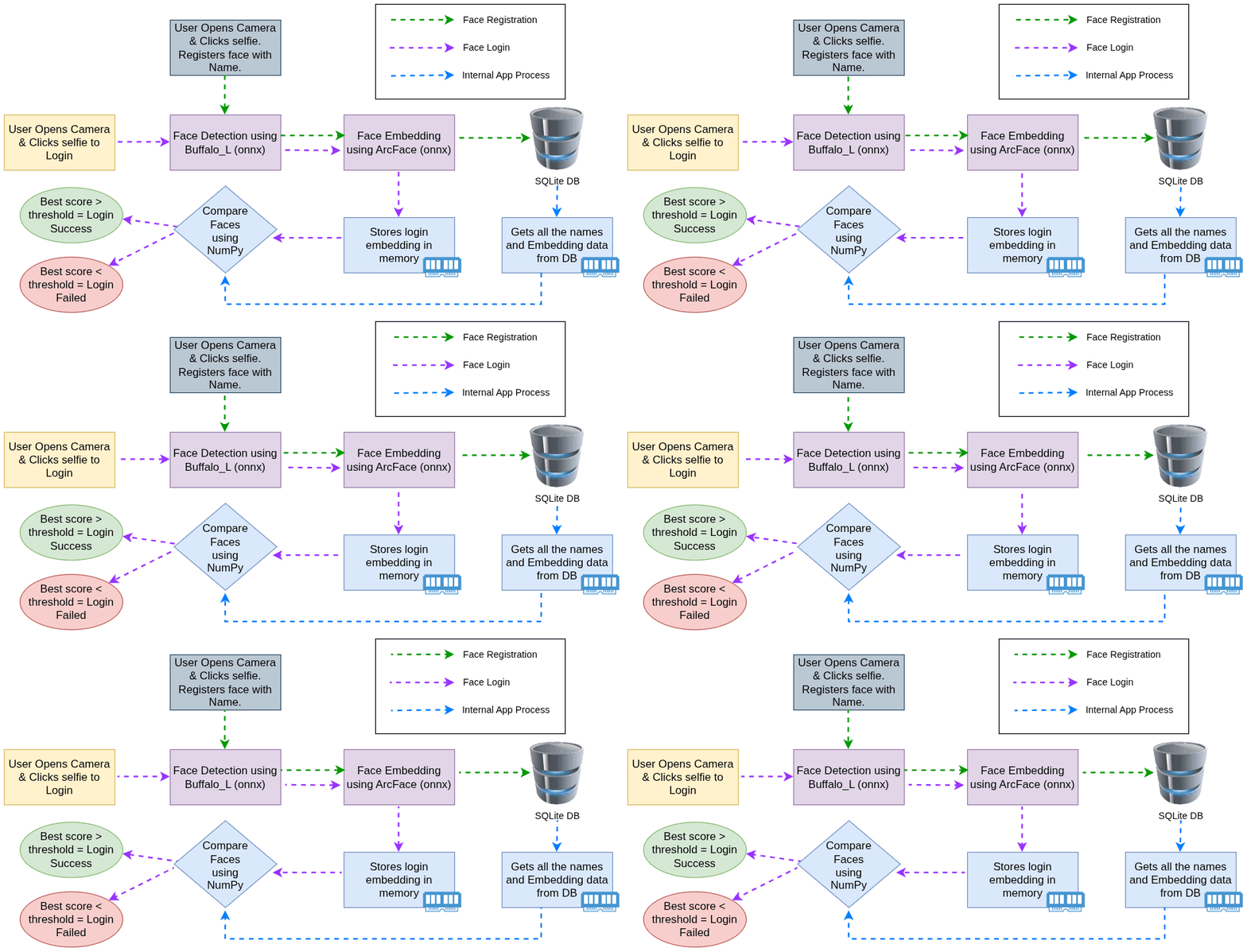
| Model | Source Link | Size | Remarks |
|---|---|---|---|
| det_10g.onnx | buffalo_l | 17MB | Face Detection |
| arc.onnx | arcface-onnx | 137MB | Face Recognition |
🧑💻 Quickstart Guide
📱 Download & Run the Android App
You can check the Releases and downlaod the latest version of the android app on your phone.
If you use the
Downloadbutton from the app, you can save the images in one of the mentioned folders:Downloads,Picturesand videos inDownloads,Movies,Videosdue android file access restrictions onAndroid 11+.
💻 Download & Run the Windows or Linux App
You can check the
Releases
and downlaod the latest version of the app on your
Linux
or
Windows
platform. The Linux app has no extension, you may need to change the permission of the file to run it. The Windows app will have an
exe
extension, just double click & run it (You may need to create an exception for Antivirus if there is any detection).
🐍 Run with Python
-
Clone the repo
-
Run the application
</> GitHub Link
You may checkout the code & other technical details in our GitHub Repo
🦾 Build your own App
The Kivy project has a great tool named
Buildozer
which can make mobile apps for
Android
&
iOS
📱 Build Android App
A Linux environment is recommended for the app development. If you are on Windows, you may use
WSL
or any
Virtual Machine
.
# add the python repository
sudo add-apt-repository ppa:deadsnakes/ppa
sudo apt update

# install all dependencies.
sudo apt install -y ant autoconf automake ccache cmake g++ gcc lbzip2 libffi-dev libltdl-dev libtool libssl-dev make openjdk-17-jdk patch patchelf pkg-config unzip wget zip git python3.14 python3.14-venv python3.14-dev # python3-dev python3-pip (if required)

# optionally you may check the java installation with below commands
java -version
javac -version

# install python modules
git clone https://github.com/daslearning-org/face-ai.git
cd face-ai/app
python3.11 -m venv .env # create python virtual environment
source .env/bin/activate
pip install -r req_android.txt

# build the android apk
buildozer android debug # this may take a good amount of time for the first time & will generate the apk in the bin directory
🖳 Build Computer Application (Windows / Linux / MacOS)
A
Python
virtual environment is recommended and please follow the same steps from above till the pip module installations (do not require buildozer for desktop apps). It builds a native app depending on the OS type i.e.
.exe
if you are running
PyInstaller
from a Windows machine. Build computer apps from
docker image
for any OS type.
# install pyinstaller
pip install pyinstaller

# generate the spec file <<OPTIONAL>>
pyinstaller --name "dlDesktop" --windowed --onefile main.py # optional as it is already created in the repo

# then update the spec file as needed
# then build your app which will be native to the OS i.e. Linux or Windows or MAC
pyinstaller dlDesktop.spec